
You are reading this guide on IPTV USA, the official SmartVPro website (smartvpro.us). See our IPTV subscription USA plans.
TiviMate does not come with any channels. It is a player, and a very good one. It takes the login from your IPTV subscription and lays the channels out in a guide that feels a lot like cable. That is why so many people on Fire TV switch to it after trying other apps.
This guide covers setup on a Fire TV Stick and Android TV devices, the Premium question and the handful of settings that make the biggest difference.
Which devices does TiviMate run on?
TiviMate runs on Android-based TV devices: Fire TV Sticks and Fire TV Cubes, Google TV and Chromecast with Google TV, Android TV boxes and many Android-based smart TVs.
It is not available for iPhone, Apple TV, Samsung (Tizen) or LG (webOS) TVs. On those, see our best IPTV app guide for alternatives such as IBO Player Pro or IPTVX.
How to install TiviMate on a Fire TV Stick
TiviMate is not listed in the Amazon Appstore, so on Fire TV it is installed with the free Downloader app.
- On your Fire TV, go to Settings > My Fire TV > Developer options and allow installs from unknown sources for Downloader. On newer models, you may need to tap the device name in About seven times to show Developer options.
- Install Downloader from the Amazon Appstore.
- Open Downloader and enter the official TiviMate download address published on the developer’s website.
- Install the file, then delete the installer when Downloader asks, to free up space.
On Google TV and Android TV, you can usually install TiviMate straight from the Google Play Store. For the full Fire TV walkthrough with screenshots, see IPTV for Firestick.
How to add your IPTV login to TiviMate
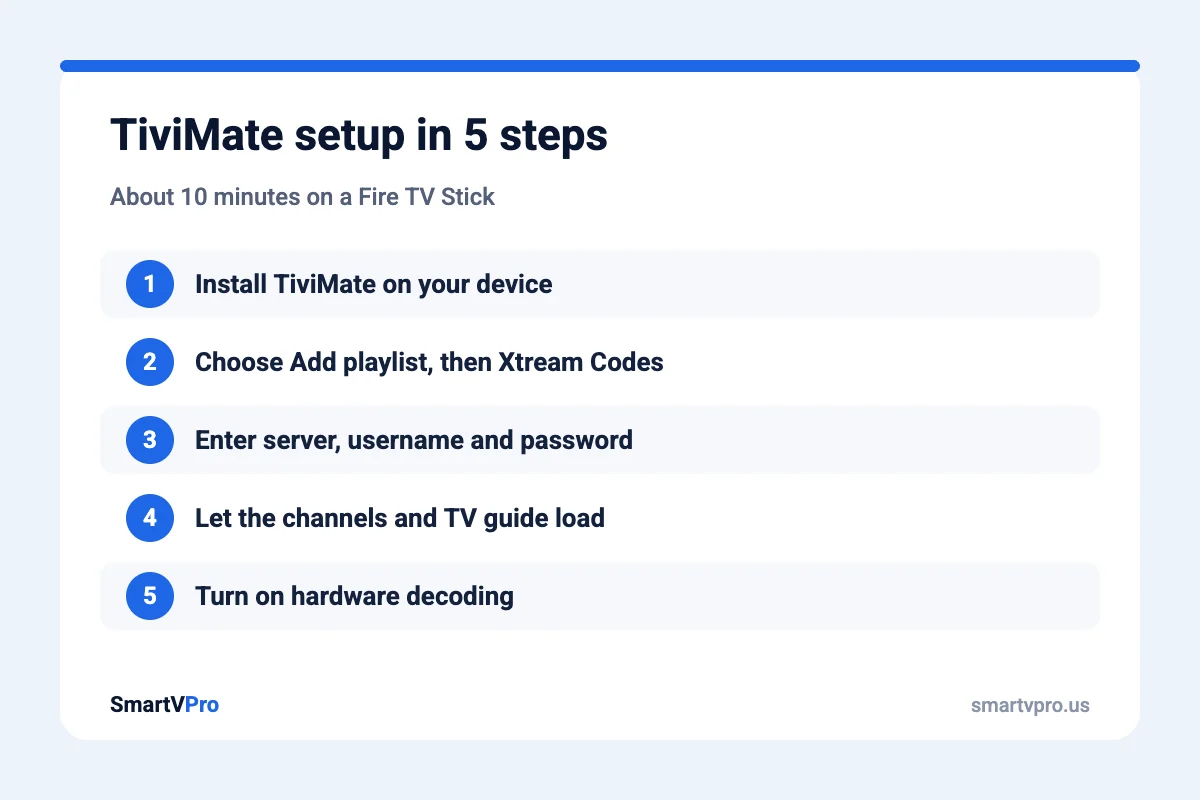
- Open TiviMate and choose Add playlist.
- Pick Xtream Codes. It loads the TV guide and the movie library more reliably than an M3U link.
- Enter the server address, username and password from your welcome email exactly as written. Watch for spaces at the end, and for capital letters.
- Give the playlist a name and press Next. TiviMate loads the channels and the TV guide. On a large list this can take a minute.
- Choose which channel groups to show. Hiding groups you never watch makes the guide much faster to browse.
If TiviMate says it cannot connect, check the login details first, then restart the device. If it still fails, message support with a photo of the error.
Is TiviMate Premium worth it?
For most people who watch every day, yes. The free version lets you watch live channels with the guide. Premium unlocks features that make daily use much nicer:
| Feature | Free | Premium |
|---|---|---|
| Live TV with TV guide | Yes | Yes |
| Favorites list | Limited | Full, with editing |
| Recording to storage | No | Yes |
| Catch-up on supported channels | No | Yes |
| More than one playlist | No | Yes |
| Multi-view (several channels on screen) | No | Yes |
Premium is bought through the TiviMate Companion app on an Android phone, then linked to your TV device. The developer sets the price and the plan options, so check the Companion app for the current offer. Your TiviMate Premium purchase is separate from your IPTV subscription.
The best TiviMate settings for smooth live TV
- Settings > Playback > Decoder: Hardware. This uses the video chip instead of the processor and helps a lot with 4K and sports.
- Buffer size: Medium or Large. A slightly larger buffer smooths out short Wi-Fi dips at the cost of a second or two of delay.
- Auto-update the TV guide once a day. Frequent updates slow down older sticks.
- Hide unused channel groups. Fewer groups means faster scrolling and faster startup.
- Choose the right quality version. On weaker Wi-Fi, use the FHD or HD version of a channel instead of 4K.
Still freezing? Most buffering starts in the home network, not the app. Our IPTV buffering fixes walk through it in order.
Using TiviMate with SmartVPro
Every SmartVPro plan works with TiviMate. Your welcome email includes the Xtream Codes details it needs, activation usually takes about 5 minutes, and WhatsApp support can walk you through setup at any hour. Plans start at $14.99 for one month, or you can try everything first with the $1 24-hour test pass. See all options on the IPTV subscription USA page.
TiviMate Questions
Does TiviMate come with channels?
No. TiviMate is only a player. You need an IPTV subscription to sign in and load channels, a TV guide and on-demand content.
Is TiviMate free?
TiviMate has a free version for live TV with a guide. Premium is paid and adds recording, catch-up, multiple playlists, multi-view and more. It is bought through the TiviMate Companion app on an Android phone.
Can I install TiviMate on a Firestick?
Yes. TiviMate is not in the Amazon Appstore, so you install it with the free Downloader app after allowing installs from unknown sources in Developer options.
Can I use TiviMate on Samsung, LG or Apple TV?
No. TiviMate only runs on Android-based devices. On Samsung and LG TVs, IBO Player Pro is a good option, and on Apple devices IPTVX or GSE Smart IPTV work well.
Should I use Xtream Codes or M3U in TiviMate?
Use Xtream Codes when your provider supports it. It loads the TV guide and the movie and series library more reliably than an M3U link.
Get the next IPTV guide by email
New setup guides, app comparisons and buffering fixes for US viewers – about two emails a month, no spam, unsubscribe in one click.