
You are reading this guide on IPTV USA, the official SmartVPro website (smartvpro.us). See our IPTV subscription USA plans.

A lot of IPTV ads say “4K” on every banner. In reality, only a small share of live TV in the US is produced in 4K. Big sporting events, some sports networks and a growing part of the movie and series library are. Most news and general entertainment channels are still HD or Full HD.
That is not a problem as long as you know what to expect. Here is how 4K IPTV actually works, and how to set up your home so the 4K channels look the way they should.
Is all IPTV in 4K?
No. An IPTV channel can only be as sharp as the original broadcast, so a channel that is filmed in HD will not become true 4K just because the app or the TV says 4K.
With SmartVPro, channels play in 4K when the original broadcast is in 4K. Otherwise they play in Full HD or HD. Many channels come in several quality versions, labeled in the channel list, so you can choose the one that suits your connection. Upscaled “4K” versions of HD channels exist across the industry, and they can look a little sharper on a big screen, but they are not the same as native 4K.
What internet speed do I need for 4K IPTV?
Plan on 25 Mbps per 4K stream, measured on the TV or streaming device itself, plus headroom for everything else in the house.
| What is playing | Speed to plan for |
|---|---|
| One HD or Full HD stream | 10 Mbps |
| One 4K stream | 25 Mbps |
| One 4K and one HD stream | 35 Mbps |
| Two 4K streams (2-device plan) | 50 Mbps |
The number on your internet bill is the speed to the router, not to the TV. On Wi-Fi through two walls, a 300 Mbps plan can easily drop to 20 Mbps at the TV. Run a speed test app on the device you watch on before you blame the stream. The FCC broadband speed guide is a good reference for what different activities need.
Which devices play 4K IPTV well?
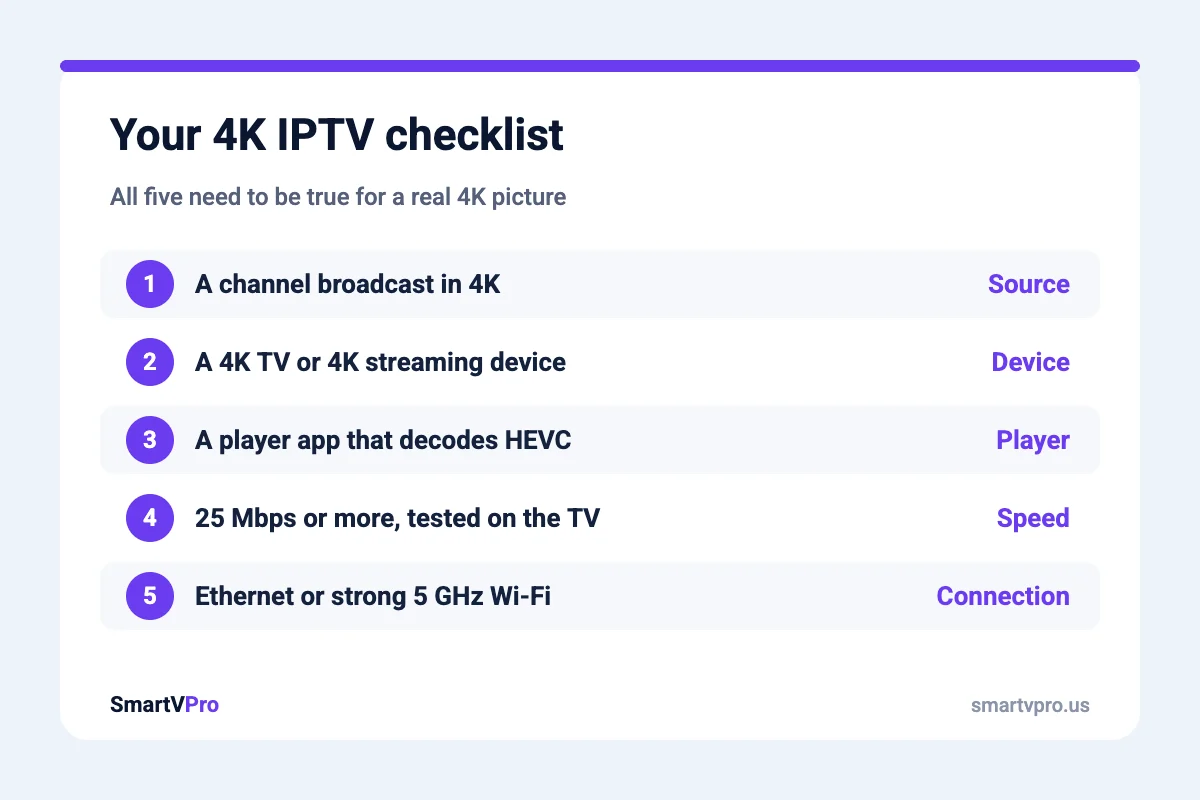
The device matters as much as the internet. To play 4K IPTV it needs a 4K output, enough processing power and support for HEVC (H.265) video, which is how most 4K streams are compressed.
- Fire TV Stick 4K and Fire TV Stick 4K Max. The most common choice in the US. The standard Fire TV Stick (non-4K) tops out at Full HD. Our Firestick setup guide covers both.
- Android TV and Google TV devices. Chromecast with Google TV (4K) and Android TV boxes with 4K output work well with most IPTV player apps.
- Recent Samsung and LG smart TVs. They can play 4K through IPTV apps from their own app stores, though older models can struggle with high-bitrate sports.
- Apple TV 4K. Very capable hardware. Pick a player app from the App Store that supports your login type.
If your device is more than five or six years old, it may decode 4K but stutter during fast motion. A newer streaming stick is often the cheapest upgrade for a better 4K picture.
How do I set up 4K IPTV at home?
- Connect the TV with Ethernet if you can. A cable is the single best fix for 4K streams. Fire TV Sticks need a small Ethernet adapter.
- If you use Wi-Fi, use 5 GHz. Keep the router in the same room or the next one.
- Set the TV and device to 4K output. Check the display settings on the stick or box. Some ship set to 1080p.
- Turn on hardware decoding in the player. Most IPTV players have this in their video or player settings.
- Pick the 4K version of the channel. Look for the 4K or UHD label in the channel group.
- Close other streams in the house during big games. Two 4K streams and a gaming console download can saturate a 50 Mbps connection.
Still seeing freezes? Our guide on why IPTV keeps buffering goes through the fixes in order.
Is 4K worth it for live sports?
For big games on a large TV, yes. Fast motion looks noticeably cleaner and on-screen graphics are sharper. On a 43-inch TV across the room, Full HD at a stable frame rate often looks just as good, and it is far less sensitive to Wi-Fi dips. Our honest advice: watch the big event in 4K over Ethernet, and keep Full HD as the default for everyday channels. More tips for game day are in our IPTV for sports guide.
Does 4K cost extra with SmartVPro?
No. 4K channels, Full HD and HD versions are all included in every plan at no extra cost. Plans start at $14.99 for one month, and the 12-month plan works out to about $5.42 a month. If you want to watch 4K on two TVs at the same time, choose a 2-device plan and make sure your connection has about 50 Mbps to spare. Plans are on the IPTV subscription USA page.
4K IPTV Questions
What internet speed do I need for 4K IPTV?
Plan on about 25 Mbps per 4K stream, measured on the TV or streaming device you watch on. Two 4K streams at once need about 50 Mbps, plus extra for anything else in the house.
Are all IPTV channels in 4K?
No. A channel can only be as sharp as its original broadcast. Most US news and entertainment channels are HD or Full HD, while big sports events and part of the movie library are available in 4K.
Can a regular Fire TV Stick play 4K IPTV?
The standard Fire TV Stick outputs Full HD only. For 4K you need a Fire TV Stick 4K, Fire TV Stick 4K Max or another 4K streaming device, plus a 4K TV.
Why does my 4K IPTV keep buffering?
Usually because the TV is not getting a steady 25 Mbps. Weak Wi-Fi, other streams in the house or an older device are the common causes. Use Ethernet or 5 GHz Wi-Fi, close other streams, or switch to the Full HD version of the channel.
Is 4K included in every SmartVPro plan?
Yes. 4K, Full HD and HD versions are included in every plan at no extra cost. Plans differ only in length and number of screens.
Get the next IPTV guide by email
New setup guides, app comparisons and buffering fixes for US viewers – about two emails a month, no spam, unsubscribe in one click.